
 Public EV Charging Checklist: From Connector Compatibility to Safety
Most failed or expensive charging stops are avoidable. Before you plug in, confirm six things: the connector fits, the charger is fast enough, the status is live, the price is clear, the payment works, and the site feels safe. Then check the cable, the battery, the etiquette and your backup plan. A 60-second check can save you 30 minutes.
Why a pre-plug-in check is worth it
Public charging has improved a lot, but it is not yet as predictable as a gas pump. In J.D. Power’s 2026 EVX Public Charging Study (6,594 owners surveyed from January to June 2026), 12% of charging visits still failed. That is an all-time low, down from 14% in 2025 and 19% in 2024, but it still means about one visit in eight does not go to plan.
Satisfaction also differs widely by network. In the same study, DC fast-charging satisfaction ranged from 807 (Ionna) down to 583 (ChargePoint) on a 1,000-point scale, with Tesla Superchargers at 701, Electrify America at 616 and EVgo at 601. Location mattered too: hotels (692), gas stations and convenience stores (689) and restaurants (688) scored best, while standalone parking lots and garages (606) and dealerships (570) scored lowest.
The lesson is that a quick check, ideally before you leave and again when you arrive, removes most of the risk. These are the 12 checks, in the order that makes sense on a real trip.
Public EV Charging Quick checklist
| # | Check | Time needed |
|---|---|---|
| 1 | Connector fits (CCS, NACS, J1772, adapter) | 10 sec |
| 2 | Charger power suits your car | 10 sec |
| 3 | Live status: working and free | 15 sec |
| 4 | Recent reviews and network reputation | 30 sec |
| 5 | Price and billing method | 15 sec |
| 6 | Idle, session and parking fees | 15 sec |
| 7 | Payment and app ready | 1 min (once) |
| 8 | Battery level and preconditioning | Before you drive |
| 9 | Location safety and amenities | 10 sec |
| 10 | Cable, screen and connector condition | 10 sec |
| 11 | Etiquette and time limits | 10 sec |
| 12 | Backup charger and range buffer | 1 min |
1. Check that the connector fits your car
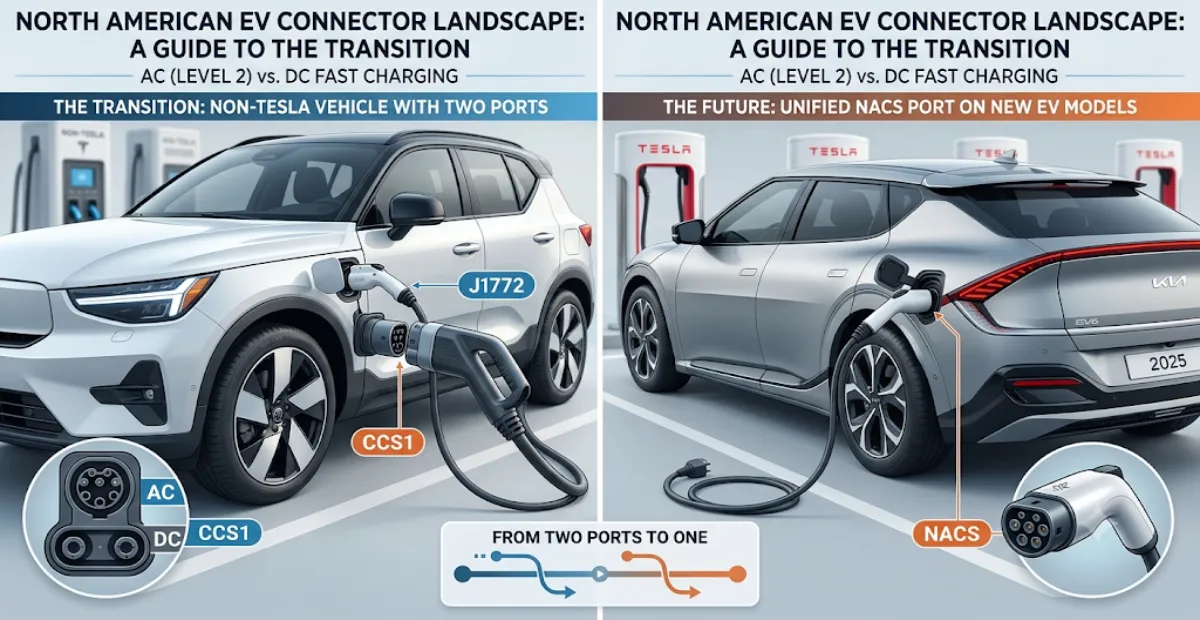
This is the first and most common stumbling block, and the connector landscape in North America is mid-transition.
| Connector | Where you see it | Notes |
|---|---|---|
| J1772 | Level 2 (AC) chargers | Used by most non-Tesla EVs for slower charging |
| CCS1 | DC fast chargers (Electrify America, EVgo and others) | The long-time standard for non-Tesla fast charging |
| NACS (Tesla-style) | Tesla Superchargers and a growing number of new EVs | Many 2025 and later models have a native port, for example the 2025 Hyundai Ioniq 5 and Kia EV6, the 2026 Toyota bZ and the 2026 Lexus RZ |
What to verify
- Does your car have a CCS1 or NACS port? If you have CCS1, you need an adapter to use Tesla Superchargers. Some automakers include one and others sell it. Published prices have ranged from about $185 to $230 (Mercedes-Benz, Volkswagen and Stellantis, for example).
- Does your car have a native NACS port? Then you can plug in at Tesla stalls directly, but you still need a CCS-to-NACS adapter for CCS1 chargers.
- Is the Tesla station open to your car? Non-Tesla EVs can only use V3 and V4 Superchargers. They are identifiable by a black collar on the charging handle. Magic Dock stalls have a CCS adapter built in and are open to all EVs.
- Is your exact model supported? Access is brand- and model-specific. Some plug-in hybrids cannot DC fast-charge at all, and a few models have limits by year.
- Third-party adapters are not manufacturer-approved and may affect your warranty. Check with your automaker.
Tip: Keep your adapter in the same place every time. A missing adapter is the single most avoidable reason for a failed stop.
2. Match charger speed to your car
A “150 kW” charger does not mean your car charges at 150 kW. You get the lower of two numbers: what the charger can deliver and what your car can accept.
| Charger type | Typical use | Good for |
|---|---|---|
| Level 1 (120 V) | Home only, in practice | Overnight top-ups |
| Level 2 (240 V AC) | Workplaces, hotels, shopping centers | Hours-long stays |
| DC fast charging | Highway corridors, major retail | A quick stop of 20 to 45 minutes |
Check before you plug in:
- Your car’s maximum DC rate. A car that peaks at 50 kW gains nothing from a 350 kW stall, and may pay a higher price for it.
- The charger’s real output. Some stations share power between two stalls, so one car plugged in can halve the other’s speed. Look for the stall number and any power-sharing note.
- Whether DC fast charging is even needed. If you will be at a mall for three hours, a Level 2 charger is cheaper and gentler on the battery.
Rule of thumb: Use DC fast charging to get across a region and Level 2 where you will stay.
3. Confirm the charger is working and free
Do this before you leave the previous stop, not when you pull in.
- Use a live app. PlugShare, your car’s built-in navigation, the network’s own app or Google Maps usually show whether stalls are available, in use or offline.
- Check each stall, not the whole site. A site with eight chargers may have only three working.
- Treat “available” as a guide, not a promise. Status data can lag. Where a charger shows as free but is reported broken, believe the recent user report.
- Look at how many stalls there are. A two-stall site fills up fast. A site with eight or more is far safer in a busy period.
- Consider the time. Weekends, holidays and evenings are busy at highway sites.
If you see a queue and several cars with their hoods up, move on to a backup option.
4. Read recent reviews and check the network
A charger can be “online” and still fail to start a session. Recent driver check-ins tell you what the status light does not.
What to look for in reviews
- Date. Reviews from the last few days matter. A year-old complaint may have been fixed.
- Pattern. One bad review is noise. Three in a week for the same stall is a sign.
- Specific faults. “Would not start,” “stopped at 80%,” “slow all day” and “screen dead” tell you more than a star rating.
- Successful sessions. Check-ins that report a good session and the actual speed are especially useful.
Network reputation
Reliability and ease of use differ by network. J.D. Power’s 2026 scores placed newer networks such as Ionna, the Mercedes-Benz Charging Network and the Rivian Adventure Network at the top of DC fast charging, and several long-established networks lower. Scores change from year to year, so treat them as a starting point rather than a verdict.
Practical approach: Pick two or three networks that score well in your region and work with your car, then add them to your navigation app as favorites.
5. Know the price and how it is charged
Public charging prices are not standardized. The same kilowatt-hour can cost very different amounts depending on the network, location, time of day and your membership.
| Pricing model | How it works | Watch out for |
|---|---|---|
| Per kWh | You pay for energy delivered | Usually the fairest. Compare across sites |
| Per minute | You pay for time plugged in | Costly if your car charges slowly or the charger is slow |
| Session fee | Flat fee to start | Adds up on short top-ups |
| Time-of-day pricing | Higher during peak hours | A stop at 6 pm may cost more than one at 2 pm |
| Subscription or member rate | Lower per-kWh price for a monthly fee | Only worth it if you charge in public often |
Before you start:
- Read the price on the screen or app before you plug in, not on the receipt after.
- Convert per-minute to per-kWh if you can. If your car charges at only 40 kW on a per-minute charger, you are paying for every slow minute.
- Compare with Level 2 or a nearby alternative if you have time. Fast charging is usually the most expensive way to add energy.
- Check member pricing. If you use one network often, a plan may pay for itself. If you use it twice a year, it will not.
- Remember home charging is usually cheaper. Public fast charging is best used for trips and emergencies, not as your daily source.
6. Watch for idle and extra fees
The price per kWh is only part of the bill.
- Idle fees. Many networks charge per minute once your session ends and your car stays plugged in or parked at the stall. Set a phone alarm for when you expect to reach your target.
- Session or connection fees. A small flat fee on top of the energy charge.
- Parking fees. At garages, hotels and airports, parking may be charged separately from charging. Check the signage.
- Time limits. Some Level 2 sites cap sessions at two to four hours and fine you beyond that.
- Guest or no-membership surcharges. Paying as a guest can cost more than paying through an account.
Habit to build: Before you walk away, read the screen for any “idle fee starts at X minutes” notice. If you are going to shop or eat, plan to be back before the limit.
7. Sort out payment before you arrive
Payment is a leading cause of failed visits, especially on Level 2 chargers. J.D. Power’s 2026 study found AC Level 2 satisfaction fell 12 points to 595, which it attributed mainly to ease of payment and ease of charging.
Get ready in advance:
- Install the apps for the networks you are likely to use, create accounts and add a payment method at home on Wi-Fi. Mobile signal at a remote site may be poor.
- Link your car to your network account if your automaker supports it. For Tesla Superchargers, non-Tesla owners generally use their automaker’s app and must link a payment method to the car first. Some brands, such as Volkswagen and Stellantis, use different apps.
- Try Plug & Charge if your car and the network support it. The car authenticates itself when you plug in. Not every model supports it.
- Carry a backup. A charge card or RFID card, and a credit card for sites with a tap reader.
- Download the map offline if you are traveling through low-signal areas.
If the app says “payment failed,” do not keep retrying at the stall. Try a different method or move to another stall or site.
8. Arrive with the right charge and a warm battery
Arrival level. Do not arrive on fumes. Aim to reach your stop with a buffer of roughly 10% or more in case the charger is broken or full and you need to go to the next one.
Charging curve. Most EVs charge fastest at lower battery levels and slow sharply above about 80%. For fast stops, the efficient approach is usually to charge to what you need for the next leg, not to 100%.
Target level. Charge to the level that gets you to the next stop with a buffer. Going from 80% to 100% can take as long as 10% to 80%, and costs more if you are paying per minute.
Preconditioning. In cold weather, a cold battery charges slowly. If your car supports it, navigate to the charger using the built-in navigation so the car warms the battery on the way. This can make a large difference to charging speed in winter.
Weather and range. Cold, wind, speed and towing all reduce range. Plan for a bigger buffer in those conditions.
9. Judge the location
Where you charge matters as much as how.
Safety
- Lighting and visibility. Prefer well-lit sites in view of a staffed building, particularly at night.
- Surroundings. A site near a gas station, restaurant or hotel usually feels safer than a dark corner of a parking lot. J.D. Power’s 2026 results showed DC fast-charging satisfaction with feeling safe up 18 points, and the best-scoring location types were hotels, gas stations and restaurants.
- Trust your instincts. If a site feels wrong, leave and use the backup.
Amenities
- Food, restrooms and shelter. A 30-minute stop is much better with coffee and a restroom.
- Weather cover. A canopy helps in rain or snow.
Accessibility
- Space and reach. Check that the cable reaches your port and that there is space to open the door.
- Accessible stalls. Leave designated accessible spaces for drivers who need them.
- Plug location. Cars with a charge port at the rear sometimes need to back in. Look at the cable length before parking.
10. Inspect the charger before you plug in
A 10-second look can save you from a failed session or damage.
Look for:
- Cable damage. Cuts, exposed wires, a cracked connector housing or a cable that is pinched or dragged on the ground.
- Debris or moisture in the connector. Do not use a wet, dirty or visibly burnt connector.
- A dead or frozen screen. If it does not respond, the charger may be offline.
- Error messages or an “out of order” notice.
- Stall number matches the number in the app, so you start the right one.
- Handle storage. A cable left on the ground is often a sign of a poorly maintained site.
If something looks wrong:
- Do not force the connector. It should seat with a firm click.
- Do not use a damaged cable. Report it through the app or the network’s phone number, which is usually on the unit.
- Check-in on the app so the next driver knows.
11. Follow charging etiquette and site rules
Good etiquette keeps stalls available for everyone.
- Do not block chargers. Park only in charging spaces if you are charging. Gas cars parked in EV spaces (“ICEing”) are a common cause of trouble. Take a photo and report it rather than confronting the driver.
- Move when you are done. Unplug and leave promptly, and consider idle fees a reminder.
- Charge only what you need at busy fast-charging sites.
- Respect time limits at Level 2 sites.
- Do not unplug another car unless the site’s rules or the network say you may, and the car is clearly finished.
- Leave the cable tidy. Hang it on the holder so it is not run over.
- Queue fairly. If all stalls are in use, wait in line and keep a space for others.
- Be courteous at shared-power sites. Check the posted rules on which stall to use.
12. Always have a Plan B
Even a well-checked stop can fail. A backup plan turns a failed charge from a crisis into a minor delay.
Before you leave:
- Identify a second charger within your remaining range, ideally on a different network.
- Keep your arrival buffer (see check 8).
- Use a trip planner. Apps such as A Better Routeplanner or your car’s native navigation account for charging stops.
- Know the emergency options. A nearby Level 2 charger, even a slow one, is better than being stranded.
If the charger fails on arrival:
- Try a different stall at the same site.
- Restart the session once. Do not repeat it many times.
- Contact the network using the number on the unit if you have a paid session that failed.
- Report the fault in the app so others know.
- Move to your backup.
Putting it together: a 60-second routine
At home or before leaving (30 seconds)
- Open the app and confirm the stall is working and free.
- Read the last few check-ins.
- Check the price and your connector.
At the site (20 seconds)
- Inspect the cable and screen.
- Park, plug in and confirm the session starts and the speed looks right.
While charging (10 seconds)
- Set an alarm for your target.
- Note any idle fee time and parking limit.
That routine covers all 12 checks without taking over your trip.
FAQ
What should I check before using a public EV charger? Check that the connector fits your car, the charger works, the price is clear, your payment method is ready, and the site looks safe and the cable is undamaged.
How do I know if a charger is working? Use a live app such as PlugShare, your network’s own app or in-car navigation, and read recent driver check-ins. Check the status of the individual stall, not the whole site.
Can any EV use a Tesla Supercharger? Many non-Tesla EVs can, but access is model-specific. Cars with CCS1 ports need an adapter, only certain V3 and V4 stations are open, and Magic Dock stalls have a built-in adapter. Check your automaker’s list.
Is public fast charging more expensive than home charging? Generally yes. Public fast charging usually costs more per kWh than home charging, and prices vary by network, location, time of day and membership.
What is an idle fee? A per-minute charge that some networks add when your session has finished but your car remains plugged in or at the stall. Set an alarm so you move on time.
Should I charge to 100% at a fast charger? Usually not. Most EVs slow sharply above about 80%, so it is faster and often cheaper to charge only what you need to reach the next stop.
How often do public charging attempts fail? J.D. Power’s 2026 study found 12% of public charging visits failed, an all-time low but still about one in eight.
Conclusion
Public charging works best for drivers who treat it as a short routine: right connector, right speed, live status, clear price, payment ready, safe site, clean cable, good manners and a backup. The infrastructure is getting better each year, with failed visits down from 19% in 2024 to 12% in 2026, but a minute of preparation is still the cheapest insurance you can buy.
🔹🔹 Follow us on facebook 🔹🔹